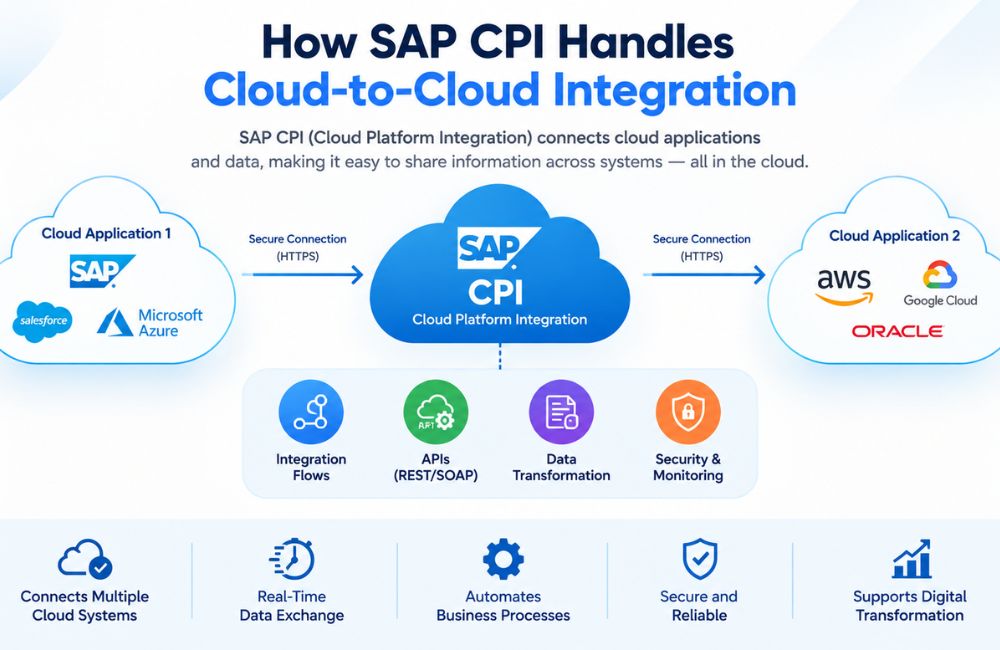
Cloud applications have become an important part of modern business systems. Organizations may use SAP applications together with CRM platforms, e-commerce systems, HR applications, payment services, analytics platforms, and other SaaS applications. Connecting these systems requires a reliable integration layer that can exchange data, transform messages, apply business rules, and deliver information to the correct application.
SAP CPI Integration is commonly used to describe SAP Cloud Platform Integration, which is now part of the Cloud Integration capability within SAP Integration Suite on SAP Business Technology Platform (SAP BTP). Cloud Integration supports integration across cloud, on-premise, and hybrid environments and can connect SAP and non-SAP applications.
Cloud-to-cloud integration means that both the source and target applications are hosted in cloud environments. Instead of creating a direct connection between every application, an integration platform can operate between them. SAP Cloud Integration provides integration flows, adapters, message processing, transformation, routing, and monitoring capabilities for these scenarios.
What Is Cloud-to-Cloud Integration?
Cloud-to-cloud integration connects two or more cloud-based applications so they can exchange data and support business processes. The applications can be provided by the same vendor or by different vendors.
For example, a company may use SAP SuccessFactors for employee information and another cloud application for payroll or workforce management. Employee data may need to move between these applications at scheduled times or when a business event occurs.
A basic architecture can be represented as:
Cloud Application A → SAP Cloud Integration → Cloud Application B
The integration platform receives information from the source application, processes the message, and sends the required data to the target application.
SAP documentation states that Cloud Integration can build and run integration flows across cloud, on-premise, and hybrid landscapes. It supports application-to-application (A2A), business-to-business (B2B), and business-to-government (B2G) scenarios.
What Is SAP CPI Integration?
SAP CPI Integration is a widely used industry term for SAP Cloud Platform Integration. In the current SAP product structure, Cloud Integration is a capability of SAP Integration Suite on SAP BTP.
Cloud Integration uses integration flows to define how messages are processed. An integration flow identifies the sender, receiver, communication adapters, and processing steps required for the scenario.
For a cloud-to-cloud scenario, both the sender and receiver can be cloud applications. The integration flow acts as the processing layer between them.
For example:
CRM → HTTPS/REST → SAP CPI Integration → REST/OData → SAP Application
The actual protocol and adapter depend on the capabilities of the connected applications.
How SAP CPI Handles Cloud-to-Cloud Integration
SAP CPI Integration uses a structured message-processing process. The source application sends a message through a supported communication channel. The sender adapter receives the message and passes it into the integration flow.
Inside the integration flow, the message can be validated, transformed, enriched, filtered, routed, or processed using other supported steps. The resulting message is then sent to the target cloud application through the configured receiver adapter.
SAP describes an integration flow as a model that specifies senders, receivers, adapters, message-processing steps, and message flows.
The general process is:
Source Cloud Application → Sender Adapter → Integration Flow → Message Processing → Receiver Adapter → Target Cloud Application
This architecture separates application connectivity from the processing logic.
Main Components of Cloud-to-Cloud Integration
Several components work together when SAP Cloud Integration connects cloud applications.
Sender System
The sender is the cloud application that starts the data exchange. It may send information through REST, SOAP, OData, or another supported communication method.
For example, a cloud CRM system may send customer information when a new customer record is created.
Sender Adapter
The sender adapter provides the technical connection between the source application and the Cloud Integration tenant.
SAP Cloud Integration provides different adapters for supported communication protocols. SAP documentation lists protocols such as REST, SOAP, OData, AS2, and AS4 for relevant service endpoints.
The selected adapter must match the communication method used by the source application.
Integration Flow
The integration flow is the central processing model. It determines what happens to a message after it enters the integration platform.
Developers can configure mapping, routing, filtering, content modification, scripts, and other processing steps according to the business requirement.
Receiver Adapter
The receiver adapter connects the integration flow to the target application. It determines how the processed message is delivered.
For example, a REST receiver can send an HTTP-based request to a cloud application’s API. An OData receiver can communicate with a supported OData service.
Receiver System
The receiver is the cloud application that receives the processed information.
It could be an SAP application, SaaS platform, CRM system, HR platform, e-commerce application, or another supported cloud service.
REST-Based Cloud-to-Cloud Integration
REST APIs are widely used for communication between cloud applications. In a REST-based integration, one application exposes an endpoint and another application sends HTTP requests to that endpoint.
For example:
CRM → REST API → SAP Cloud Integration → REST API → ERP Cloud Application
The integration flow can receive the source message, inspect its content, transform the fields, and send a new request to the target API.
Cloud Integration supports API-based integration development and can expose integration flows through REST, SOAP, and OData services.
HTTP-based communication can also use standard methods such as GET, POST, PUT, and DELETE when supported by the target API. The exact operations depend on the API exposed by the connected application.
SOAP-Based Cloud-to-Cloud Integration
Some enterprise cloud applications continue to use SOAP-based web services. SAP Cloud Integration provides SOAP adapters for supported scenarios.
For example, a cloud application can send a SOAP message to Cloud Integration. The integration flow can process the message and send another SOAP request to a target cloud service.
SAP documentation states that the SOAP adapter supports SOAP communication and SAP Reliable Messaging for applicable scenarios. SOAP versions 1.1 and 1.2 are supported by the documented SOAP SAP RM sender adapter.
SOAP-based integration is particularly relevant when the source or target application exposes enterprise web services rather than REST APIs.
OData in Cloud-to-Cloud Integration
OData is another important technology in SAP integration scenarios. It provides a standardized way to expose and consume structured business data through web services.
SAP Cloud Integration provides OData-related capabilities and adapters for supported scenarios. OData can be used to access resources and perform operations supported by the remote service.
Batch processing can also be used with supported OData scenarios. SAP documentation states that OData batch processing can group multiple operations into one request, reducing the number of calls to a remote component when the remote API supports the required behavior.
For example, several customer updates could potentially be grouped into a batch request rather than being sent as separate requests.
Data Transformation in SAP CPI Integration
Cloud applications often use different data structures. One system may use JSON while another expects XML. Even when both applications use JSON, their field names and structures can differ.
SAP CPI Integration can transform data between different source and target structures using integration-flow processing capabilities.
For example, the source application may send:
firstName
lastName
emailAddress
The target application may require:
givenName
surname
A mapping step can establish the relationship between these fields.
Transformation can also involve changing formats, combining fields, separating values, applying functions, or converting data into a structure required by the receiver.
Message Mapping
Message mapping is useful when the source and target applications use different message structures.
A developer defines the source and target structures and establishes relationships between fields. Mapping functions can then be used when simple field-to-field mapping is not enough.
For example, a source system may provide a date as:
2026-09-21
while the target system may require a different date representation.
The integration flow can apply an appropriate transformation before sending the message.
This approach allows different cloud applications to communicate even when they do not use identical data models.
Routing Data Between Cloud Applications
Cloud-to-cloud integration may require conditional routing.
For example, an organization may use different cloud applications for different regions. Customer information could be routed according to country, business unit, product type, or another business condition.
A simplified flow could be:
Customer Data → Router → Europe System
Customer Data → Router → Asia System
Customer Data → Router → North America System
Cloud Integration supports routing as an integration-flow processing pattern. SAP documentation identifies routing and mapping as examples of integration patterns that can be modeled in an integration flow.
Authentication and Security
Cloud-to-cloud integration requires secure communication between the connected applications.
The authentication method depends on the API and adapter. Common approaches in cloud environments can include OAuth-based authentication, basic authentication where supported, client certificates, and other credential mechanisms.
The integration platform must store and use credentials according to the security requirements of the connected systems. API security may also be handled through SAP API Management when the architecture requires controlled API exposure.
SAP explains that API Management complements Cloud Integration by providing functions such as authentication, authorization, traffic policies, API publishing, monitoring, and lifecycle governance.
Security should therefore be considered at both the integration-flow level and the API-management level when both capabilities are used.
API Management and Cloud-to-Cloud Integration
API Management can provide an additional control layer around APIs.
For example:
Cloud Application → API Management → Cloud Integration → Target Cloud Application
API Management can handle API-related security and traffic policies, while Cloud Integration can perform message transformation, routing, orchestration, and backend connectivity.
SAP describes API Management as a complementary capability to Cloud Integration within SAP Integration Suite. It supports API security, traffic management, lifecycle governance, publishing, and monitoring.
This separation allows API governance and integration processing to be handled according to their specific responsibilities.
Real-Time Cloud-to-Cloud Integration
Some business processes require data to move between applications with minimal delay.
A real-time integration can begin when the source application sends an API request or event. Cloud Integration receives the message, processes it, and sends the resulting message to the target application.
For example:
Order Created → Cloud CRM → SAP CPI Integration → Cloud ERP
The integration flow can transform the order and send the required information to the ERP application.
The actual processing time depends on network conditions, application response times, message size, processing logic, and the behavior of the connected systems.
Scheduled Cloud-to-Cloud Integration
Not every integration requires real-time communication.
Some applications may exchange data on a scheduled basis. For example, employee information could be synchronized every hour, or financial records could be transferred once per day.
A scheduled integration can retrieve data from the source system, process the records, and send them to the target application.
This approach can be useful when the source or target application does not require immediate synchronization or when its API usage limits make scheduled processing more suitable.
Error Handling in Cloud-to-Cloud Integration
Cloud applications can become temporarily unavailable. APIs can return errors. Authentication tokens can expire. Network connections can fail. Data can also contain invalid or incomplete values.
A production integration therefore requires appropriate error-handling logic.
SAP’s enterprise-grade integration guidance emphasizes resilience, loose coupling, resource management, graceful failure handling, supervision, and readability when designing integration flows.
For example, an integration flow can detect a failed receiver request and handle the error according to the business process. The exact error-handling design depends on the integration requirements and the behavior of the connected APIs.
Monitoring SAP CPI Integration
Monitoring allows integration teams to determine whether messages were processed successfully.
A developer or administrator may need to investigate failed messages, authentication errors, mapping problems, API responses, or connectivity issues.
Cloud Integration provides monitoring capabilities for deployed integration content. SAP also provides APIs for accessing Cloud Integration resources, including monitoring-related information.
Effective monitoring should provide enough information to identify the processing stage where a problem occurred without exposing sensitive business information unnecessarily.
Prebuilt Integration Content
Cloud-to-cloud projects do not always require every integration flow to be created from an empty design.
SAP Integration Suite provides prepackaged integration content for different business processes and applications. SAP documentation states that prepackaged content can include integration flows, value mappings, documentation, and related artifacts.
SAP Business Accelerator Hub also provides integration content and adapters for supported scenarios. Cloud Integration includes prebundled adapters and can consume additional integration adapters from the SAP Business Accelerator Hub.
The availability of reusable content depends on the specific applications and business scenario.
SAP CPI Integration Cloud-to-Cloud Example
Consider a company using a cloud-based CRM application and SAP SuccessFactors.
The CRM application contains customer-related information, while SuccessFactors manages employee-related information. If the business process requires data to move between these cloud applications, Cloud Integration can act as the integration layer.
The source application sends data through an API. SAP CPI Integration receives the message through the configured sender adapter. The integration flow validates and transforms the data, then routes the processed message to the appropriate receiver.
The receiver adapter sends the transformed data to the target cloud service.
The architecture can be represented as:
Source Cloud App → REST/SOAP/OData → Cloud Integration → Mapping/Processing → REST/SOAP/OData → Target Cloud App
This model keeps the application connections controlled through the integration platform.
SAP CPI Integration for Multi-Cloud Environments
Many organizations operate applications from several cloud providers. A business may use SAP cloud services alongside Microsoft, Salesforce, Google Cloud, AWS, or other SaaS platforms.
Cloud Integration can connect SAP and non-SAP systems. SAP states that Cloud Integration supports SAP and non-SAP applications across cloud, on-premise, and hybrid landscapes.
For non-SAP cloud applications, connectivity depends on the available APIs, adapters, authentication methods, and supported integration capabilities.
SAP Integration Suite also provides Open Connectors for connecting to more than 160 non-SAP applications through prebuilt connectors, according to SAP documentation.
Performance Considerations
Cloud-to-cloud integration performance depends on several factors. These include message size, number of processing steps, transformation complexity, external API response time, network conditions, and message volume.
SAP recommends considering resource management when designing enterprise-grade integration flows. Cloud Integration processing can use computing resources, database persistence, and messaging services depending on the capabilities used by the flow.
Unnecessary processing should therefore be avoided. Integration flows should be designed with clear processing logic and appropriate error handling.
API limitations also need to be considered. A target cloud application may impose limits on request frequency, payload size, concurrency, or other API characteristics.
Best Practices for Cloud-to-Cloud Integration
A cloud-to-cloud architecture should use clear integration responsibilities. The integration flow should define what data enters the process, how it is transformed, where it is routed, and which system receives the result.
Use the communication protocol supported by the connected applications. REST, SOAP, and OData are common choices, but the correct option depends on the API and business requirement.
Keep authentication credentials and security information properly managed. API Management can be used where centralized API security, traffic management, lifecycle governance, and monitoring are required.
Integration flows should also be readable and maintainable. SAP’s enterprise-grade guidance specifically identifies readability as an important quality for long-term integration maintenance.
AEO: How Does SAP CPI Handle Cloud-to-Cloud Integration?
SAP CPI Integration handles cloud-to-cloud integration by receiving data from one cloud application, processing it through an integration flow, transforming or routing the message, and sending the resulting data to another cloud application.
The basic process is:
Source Cloud Application → Adapter → Integration Flow → Transformation/Routing → Receiver Adapter → Target Cloud Application
Cloud Integration supports SAP and non-SAP applications and can operate across cloud, on-premise, and hybrid environments.
REST, SOAP, and OData are among the technologies used in supported Cloud Integration scenarios.
GEO: SAP CPI Cloud-to-Cloud Integration Explained
SAP CPI Integration provides a cloud-based integration layer between applications. Instead of requiring each cloud application to communicate directly with every other application, Cloud Integration can receive, process, transform, and route messages between them.
A typical cloud-to-cloud architecture is:
Cloud CRM → SAP Cloud Integration → Cloud ERP
The CRM system sends data to an integration endpoint. Cloud Integration processes the message according to the configured integration flow. The receiver adapter then sends the processed data to the ERP system.
For larger environments, the architecture can include multiple cloud applications, API Management, reusable integration content, monitoring, and additional SAP Integration Suite capabilities.
Frequently Asked Questions
What is cloud-to-cloud integration?
Cloud-to-cloud integration connects two or more cloud-based applications so they can exchange data. An integration platform can process, transform, route, and deliver the information between the applications.
Can SAP CPI connect two cloud applications?
Yes. Cloud Integration can connect cloud applications and process messages between them. SAP documentation states that Cloud Integration supports cloud, on-premise, and hybrid landscapes.
What protocols can SAP CPI use for cloud integration?
Supported protocols depend on the adapter and scenario. SAP documentation identifies REST, SOAP, OData, AS2, and AS4 among the supported protocol types for relevant Cloud Integration endpoints.
Does SAP CPI support REST APIs?
Yes. Cloud Integration supports API-based integration scenarios involving REST services. SAP documentation also describes REST as a supported protocol for relevant Cloud Integration endpoints.
Can SAP CPI integrate non-SAP cloud applications?
Yes. Cloud Integration supports SAP and non-SAP applications. SAP Integration Suite also provides Open Connectors for more than 160 non-SAP applications through prebuilt connectors.
What is an iFlow in cloud-to-cloud integration?
An iFlow, or integration flow, defines how a message is processed. It specifies the sender, receiver, adapters, processing steps, and message flows used in the integration scenario.
Does cloud-to-cloud integration require API Management?
Not every cloud-to-cloud integration requires API Management. Cloud Integration can perform integration processing directly. API Management can be added when the architecture requires API security, traffic management, publishing, lifecycle governance, or related API capabilities.
Can SAP CPI perform data transformation?
Yes. Integration flows can include processing steps for transformation and mapping. This allows data from one application to be converted into a structure required by another application.
How is cloud-to-cloud integration monitored?
Cloud Integration provides monitoring capabilities for deployed integration content. SAP also provides APIs that can be used to access Cloud Integration resources and monitoring-related information.
Is SAP CPI suitable for multi-cloud integration?
Cloud Integration can connect SAP and non-SAP applications across cloud environments. The exact integration design depends on the APIs, adapters, authentication methods, data structures, and requirements of the connected applications.
Conclusion
Cloud-to-cloud integration allows applications hosted in different cloud environments to exchange business data through a controlled integration architecture. SAP CPI Integration, now represented by the Cloud Integration capability within SAP Integration Suite, provides integration flows, adapters, transformation, routing, and message-processing capabilities for these scenarios.
A typical architecture places Cloud Integration between the source and target applications. The source sends data through a supported protocol such as REST, SOAP, or OData. The integration flow processes the message, applies required transformations and business rules, and sends the resulting data to the target cloud application.
Cloud Integration can also operate as part of a larger SAP Integration Suite architecture. API Management can provide API security and governance, while Open Connectors can extend connectivity to supported non-SAP applications.
For reliable cloud-to-cloud integration, the architecture should account for authentication, API limitations, message transformation, error handling, monitoring, resource usage, and maintainability. SAP’s enterprise-grade integration guidance emphasizes resilience, loose coupling, resource management, graceful failure handling, and readable integration-flow design.